
Plathong.NET VPS and Cloud Server gives you dedicated computing resources — ideal when you need more performance than Shared Hosting for internal systems, applications, or specialized servers.
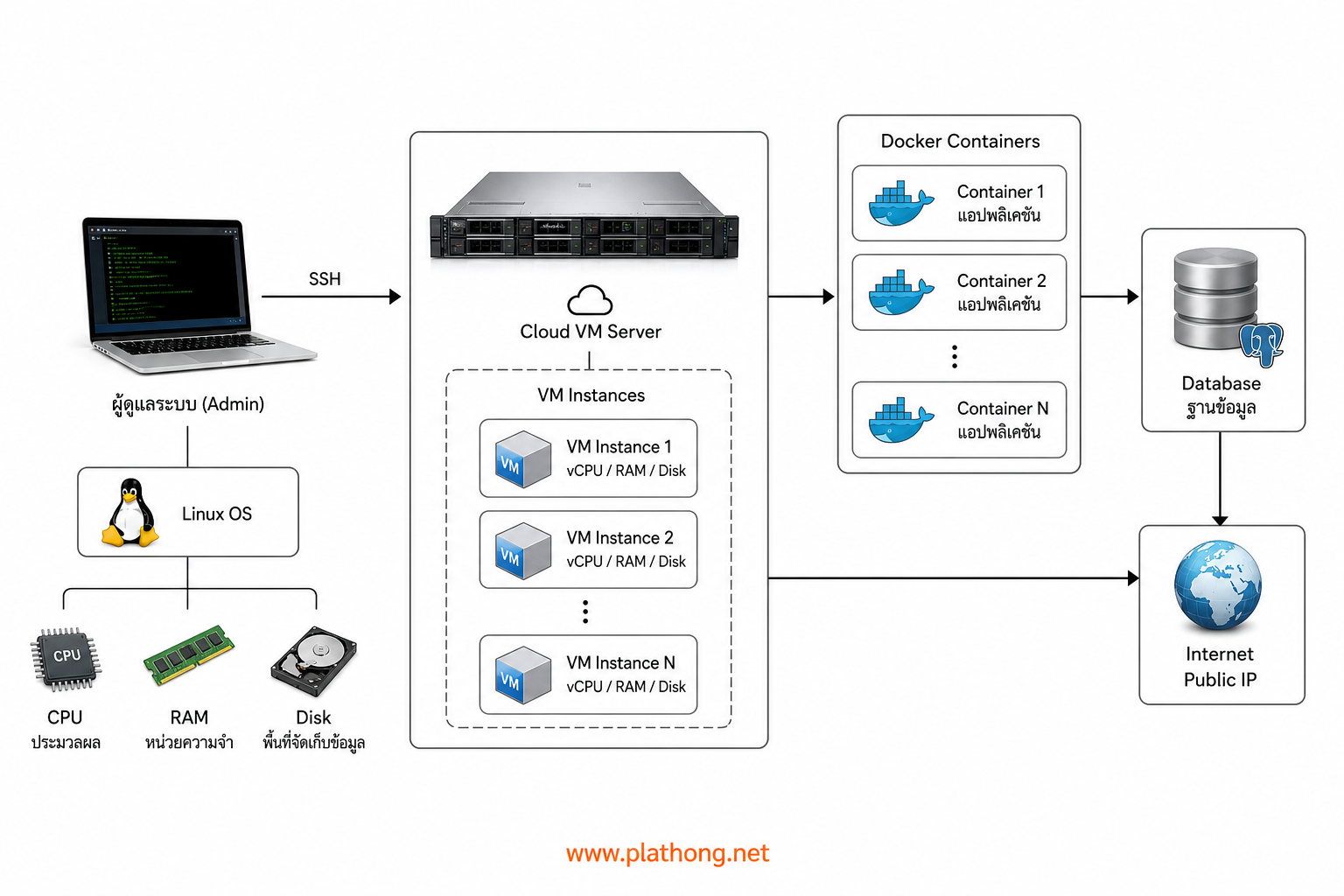
Service Highlights
- CPU 2–4 Cores
- 1 Gbps network
- RAM 4–16 GB
- SSD Storage 100–300 GB
- Supports CentOS, Ubuntu, Debian, Windows
- Brand-name servers and standard networking
- Firewall and managed support team
Ideal Use Cases
- Web/app systems needing consistent resources
- Database servers or internal systems
- Workloads requiring full software installation freedom
- Graduating from Shared Hosting as your site grows
Built for developers who build their own systems
Our VPS is ideal for developers building Full Stack systems themselves — install and control the environment fully. Whether it is a Node.js app, a Next.js site, or other backend services, you can set up Nginx, Load Balancing, Redis, PostgreSQL, or MongoDB as your project needs, then connect Git for CI/CD to build and deploy automatically on new code — less manual deployment, faster development and delivery
- Run Node.js / Next.js on your own server
- Install Nginx, Load Balance, Redis, PostgreSQL, MongoDB as needed
- Control the Full Stack from Frontend and Backend to API
- Connect Git repository and set up auto deploy / CI/CD
Run with Docker Containers — full stack
Want your app to behave the same in production as on your dev machine every time? Install Docker on your VPS and package your services as Containers — separate app, database, and Redis clearly, restart individually without affecting the whole machine, and migrate easily as your business grows
Use Docker Compose to define your entire stack in one file and bring it up with a single command. Connect Git + CI/CD to build images and deploy automatically on new code — fewer "works on my machine" failures from mismatched environments
- Install Docker / Docker Compose on Ubuntu, Debian, or CentOS
- Run multiple Containers together: Web + API + Redis + PostgreSQL / MongoDB
- Standardize app versions and dependencies across all environments
- Rolling updates / restart services individually without rebooting the whole server
- Ideal for teams that want fast deploys, easy maintenance, and future scalability
Store files with Object Storage
Do not let media files fill your server SSD — store images, videos, backups, and downloads on scalable Object Storage. Pay for what you use, no need to buy oversized disks upfront, and access via API / SDK from Node.js, Next.js, or any app running on your VPS
Ideal for sites with heavy uploads, streaming systems, enterprise document libraries, or apps that need fast, stable file delivery without impacting database and app performance on the server
- Store media, backups, and static assets off the server disk
- Scale storage as data grows — no server migration because disk is full
- Connect via API / SDK from apps on VPS or Docker Containers
- Reduce I/O load on server SSD — faster app and database response
- Design alongside CDN / streaming / backup systems
Speed up with CDN — Cloudflare
Connect your VPS web and apps to a CDN, especially Cloudflare, to distribute content to global edge locations — lower latency for users worldwide, faster page and static file loads, plus basic DDoS protection and easy SSL/TLS setup
Ideal for corporate sites, online stores, geographically distributed users, or workloads serving large volumes of images / JS / CSS — without upgrading the server just because static traffic increased
- Connect your domain to Cloudflare CDN instantly
- Cache static assets to reduce CPU and bandwidth load on VPS
- SSL/TLS and protection against abnormal traffic
- Works well with Nginx, Docker, and Object Storage
- Faster page loads in Thailand and internationally
Technologies you can install on the server
- Container: Docker, Docker Compose
- Storage: Object Storage (media / backups)
- CDN: Cloudflare
- Frontend / Backend: Node.js, Next.js
- API: REST API
- Web server: Nginx, Load Balance
- Cache: Redis
- Database: PostgreSQL, MongoDB
- Delivery: Git + CI/CD
Note: Want us to design and build the system for you? See Web Design / System Development · For general web hosting see Web Hosting